
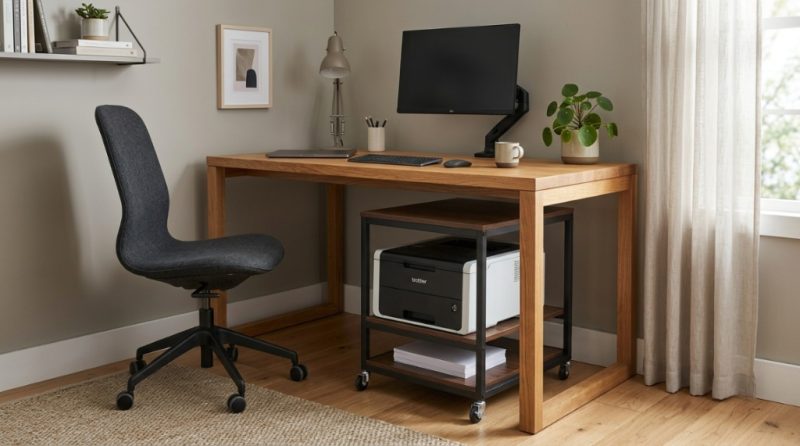
You know the scene. The printer is shoved onto a corner of your desk, cables are dangling like jungle vines, and every time you need a document, you have to move a stack of papers just to reach the paper tray. Your workspace is supposed to be a hub of productivity, but instead it feels cramped and chaotic. You need a smarter solution to reclaim that space and cut the clutter. The answer lies in choosing the right printer organizer workspace solution that isn’t just a table, but a true organizational tool. A dedicated stand transforms your printing equipment from an eyesore into an efficient utility, freeing up your main desk for the work that actually matters.
Why Does a Printer on Your Desk Create So Much Clutter?
A desk printer is a volume hog. It occupies precious real estate needed for your keyboard, monitor, and paperwork. The problem isn’t just the footprint; it is the domino effect of disorganization that follows. Once the printer lands on your desk, paper reams, ink cartridges, and stray cables multiply around it. This visual noise breaks your concentration and makes every task feel harder than it needs to be. By relocating the printer onto a specialized stand, you instantly restore usable surface area and eliminate that cluttered feeling.
The Hidden Cost of Desk Space
Think about it. The average printer takes up roughly 1.5 square feet of desk space. That space is worth money in terms of productivity and focus. Stands that hold the printer vertically or on a lower tier allow you to maintain a clear, minimalist workspace that encourages deep work.
What Features Make a Printer Stand a True Workspace Organizer?
Not all stands organize effectively. A true printer organizer workspace solution includes built-in storage for supplies, cable management systems, and a sturdy weight capacity. Look for models with open shelves for paper reams and small drawers for ink cartridges, staples, and spare cords. Without these features, you simply move the clutter from the top of the desk to the floor around the stand.
- Storage Drawers: For ink, toner, and sticky notes.
- Open Shelving: For holding paper stock and finished documents.
- Cable Management Holes: To hide and route power and USB cables.
- Ventilation: A mesh or open back to prevent printer overheating.
Mobile vs. Stationary Stands
If you print from multiple locations or share a printer with a team, a stand with caster wheels is your best ally. You can roll the heavy machine into a corner when not in use. A stationary stand is better for a dedicated home office where the printer has a permanent home. Choose based on how often you need to access the back of the printer for paper jams or changing toner.
How Does a Stand Improve Your Daily Workflow?
A dedicated stand improves workflow by putting all printing supplies within arm’s reach but out of the visual workspace. When you need to print, you simply turn or slide the stand next to your chair. When you finish, you push it back into its designated spot. This reduces the physical and mental friction of having to clear a path to your printer every time you hit “print.” The stand effectively creates a dedicated “print zone” separate from your “focus zone.”
The “Grab and Go” Advantage
Imagine needing a fresh pad of sticky notes. Instead of digging through a messy drawer, you open the stand’s storage shelf and grab one instantly. This efficiency saves you an estimated 10 to 15 minutes per day in wasted search time. Over a year, that is nearly a full workweek of recovered time.
Which Type of Storage Layout Works Best for Different Office Sizes?
The best layout depends entirely on your available floor or cabinet space. For a small cubicle or compact home desk, an under-desk printer stand that slides over your file cabinet is ideal. For a larger office, a vertical storage tower with multiple shelves offers complete organization. The most efficient option for most people is a two-tier stand: the printer sits on top, while paper and supplies go on the bottom shelf.
| Office Size | Recommended Stand Type | Key Benefit |
|---|---|---|
| Small (under 50 sq ft) | Under-desk sliding stand | Frees up floor space entirely |
| Medium (50-100 sq ft) | Vertical tower with 2-3 shelves | Creates a dedicated print station |
| Large (over 100 sq ft) | Freestanding cabinet with drawers | Hides all supplies out of sight |
Corner Units for Awkward Spaces
Don’t ignore that empty corner. L-shaped or triangular printer stands fit perfectly into unused corners, turning dead space into a functional organizational hub. This is a great way to keep the printer completely off your main desk line.
How Do You Choose the Right Size and Weight Capacity?
Measure your printer’s width, depth, and height before buying any stand. Add at least 2 inches on each side for easy access to paper trays and control panels. The stand must support the weight of the printer plus a full ream of paper. Look for a minimum weight capacity of 50 pounds for a standard home laser printer or 100 pounds for a heavy-duty office machine. Going over capacity can cause the stand to wobble or collapse.
- Measure the printer’s base footprint.
- Measure the height clearance needed for the document feeder.
- Check the weight of the printer (find specs online).
- Add 10 pounds for supplies like paper and toner.
- Choose a stand rated for at least that total weight.
Can a Stand Really Help with Cable Management?
Yes, absolutely. Most modern printer stands include dedicated channels, grommets, or clips specifically designed to route cables out of sight. Without these features, cables become a tangled mess that collects dust and poses a tripping hazard. A good stand lets you feed the power cord and USB cable through a hole in the top shelf, then down the back leg where it stays hidden. This simple feature instantly makes your workspace look cleaner and more professional.
Just like physical clutter can derail your focus, digital clutter and unorganized tracking can stall your business growth. If you are running digital ads alongside your physical operations, experiencing WA Face Problems Tracking Campaign Performance Metrics can be just as frustrating as a messy desk. Streamlining both your physical workspace and your digital dashboards is key to peak productivity.”

Hide the Power Strip
Many stands include a small shelf or hook designed to hold a power strip. Mounting the strip underneath the stand keeps all plugs hidden and prevents the “spaghetti octopus” look behind your desk. This also protects cables from being kicked or pulled accidentally.
When Should You Replace a Basic Table with a True Printer Stand?
You should replace an ordinary table or folding table immediately when you notice paper supplies piling up on the floor next to it. Another clear sign is if you must crawl under your desk to retrieve a printed document because the printer is too high or wedged in a tight spot. If your current setup causes you to leave debris, empty ink boxes, and stray papers scattered around, you have outgrown a basic surface. Invest in a purpose-built stand that organizes vertically.
The “Weekly Mess” Test
Take a photo of your printer area every Friday. If the mess around it grows larger throughout the week, your setup isn’t organizing—it is just enabling clutter. A true organizer stand stops that accumulation because it provides a designated home for every supply.
Is Wood, Metal, or Plastic the Best Material for Durability?
Metal is the most durable material for a heavy printer, especially one that vibrates during operation. Steel frames with a powder-coated finish resist scratches and rust. Wood looks attractive in a home office but can warp if exposed to humidity or heavy weight. Plastic stands are lightweight and cheap but can crack over time under the constant load of a printer. For a long-lasting solution that supports both the weight and the vibration, choose a metal frame stand.
- Steel: Best for durability. Supports up to 100+ lbs. Heavy.
- MDF/Particle Board: Good for aesthetics. Can chip or swell over time.
- Hardwood: Beautiful but expensive. Needs care against spills.
- Plastic: Lightweight and cheap. Not recommended for daily printing.
How Do You Maintain a Clean Printer Stand Over Time?
Maintenance is simple: wipe down the surfaces weekly with a dry microfiber cloth to prevent dust buildup inside the printer. Vacuum the shelves every month to remove paper dust and toner particles. Reorganize the drawers every quarter to purge expired ink cartridges and old documents. The key is to treat the stand like a piece of fine furniture, not a storage bin. If you allow it to become a dumping ground for random office supplies, it will lose its effectiveness.
Preventing Toner Dust
Toner powder is ultra-fine and can settle on shelves. Use a damp cloth (not a dry one) to clean up toner dust to avoid spreading it into the air. Stands with closed-back cabinets are better at containing this dust than open-frame designs.
To explore a specific design that balances price and functionality, check out this resource on a printer organizer workspace that combines storage and sturdy construction.
Frequently Asked Questions
Will a printer stand work for all printer sizes?
Most stands are adjustable or come in standard sizes. Always check the product specifications for maximum width and depth. A stand that fits a compact inkjet may not fit a large office laser multifunction printer.
How much weight can a standard printer stand hold?
Standard home office stands typically hold between 50 and 100 pounds. Heavy-duty metal stands can hold up to 200 pounds. Never exceed the manufacturer’s listed weight capacity.
Do I need to assemble a printer stand?
Yes, most printer stands require assembly. You will need a screwdriver and sometimes an Allen wrench (usually included). Assembly time ranges from 15 to 45 minutes depending on the complexity of the stand.
Can I put a microwave or coffee maker on a printer stand?
No. Printer stands are not designed to handle hot appliances or liquids. The weight capacity may be adequate, but the materials are not heat-resistant. Keep coffee makers on a dedicated kitchen cart.
What is the best height for a printer stand?
Ideal height depends on your desk height. For easy access from a seated position, aim for a stand height of 24 to 30 inches. For floor use, a stand that is 18 to 24 inches tall allows you to easily bend and retrieve prints.
How do I stop the printer stand from wobbling?
Ensure all screws are fully tightened during assembly. If the floor is uneven, use leveling feet or rubber shims under the legs. For extremely heavy printers, attach the stand to the wall with safety straps for added stability.
Can a printer stand help with a messy desk?
Absolutely. By moving the printer, paper, and supplies off your desk onto a dedicated stand, you reclaim up to 30 percent of your desk surface area. This instantly makes your workspace appear cleaner and more organized.
Conclusion
Cleaning your workspace isn’t just about wiping dust off the monitor; it is about designing a system that prevents clutter before it starts. A well-chosen printer stand solves the root problem of a messy desk by giving your printing equipment a permanent, organized home. You free up valuable desk space, hide ugly cables, and keep all supplies within arm’s reach without visual distraction. Stop letting your printer rule your desk. Take a measurement of your space, pick a stand with real storage, and get back to the work that matters. A clean desk starts with a smart organizational choice—make it today.
